The previous post covered tables — basic syntax, cell styling, three-line tables, and merged cells. This post picks up a thread left dangling back on Day 5: math formulas only got a brief introduction there, and it’s time to go further.
Common Symbols and Operators
Day 5 covered how splits into inline and independent formulas, and touched on built-in symbol names like pi and alpha — the full list lives in the official reference. This section fills in two mechanics that post never got to: stacking symbol variants, and writing sub/superscripts and roots.
Symbol Variants and Accents
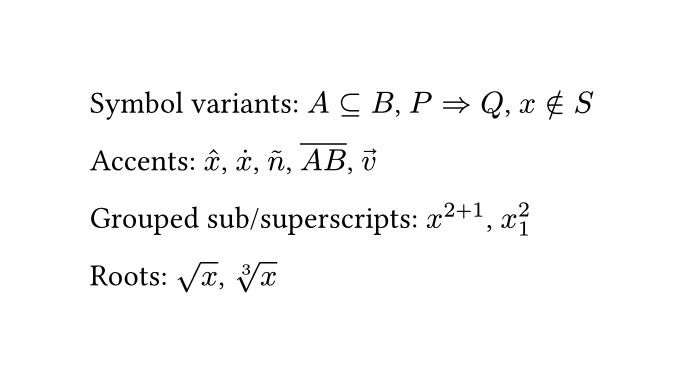
Many symbol names accept a .variant suffix that can be chained on, e.g. arrow.r plus .double becomes a double-line arrow. To find out what variants a symbol has, search its base name in the symbols reference page‘s search box — typing arrow, for instance, filters down to every arrow.xxx variant, and clicking one copies it straight away:
1 | $A subset.eq B$, $P arrow.r.double Q$, $x in.not S$ |
To add an accent mark to a variable, wrap it in functions like hat, dot, tilde, or overline:
1 | $hat(x)$, $dot(x)$, $tilde(n)$, $overline(A B)$, $arrow(v)$ |
One thing worth flagging: a vector arrow uses arrow, not vec — vec is the function for writing column vectors and matrices, a completely different job from accents. That’s a topic for a later, dedicated math article.
Grouped Sub/Superscripts and Roots
If the content of a ^ superscript or _ subscript is more than one character, it needs parentheses to group it — otherwise only the character immediately next to it gets treated as the sub/superscript:
1 | $x^(2+1)$, $x_1^2$ |
Square roots use sqrt; for an $n$-th root, use root, whose first argument is the index:
1 | $sqrt(x)$, $root(3, x)$ |
Worked Example
Fractions and Special Functions
Fractions are unavoidable in math writing, and so are functions like sin and cos. Both look simple, but each has a small trap worth knowing about — this section covers how to handle them correctly.
Writing Fractions
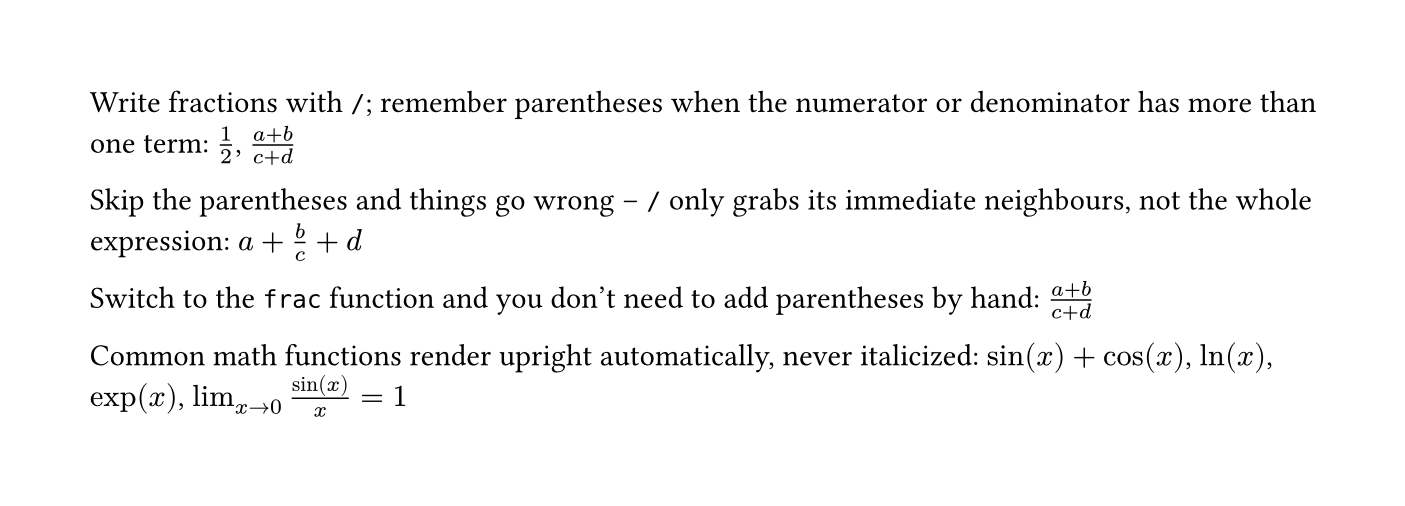
The most direct way is /. If the numerator or denominator has more than one term, remember to group it with parentheses:
1 | $1/2$, $(a+b)/(c+d)$ |
Skip the parentheses and things go wrong, because / only grabs whatever’s immediately next to it, not the whole expression:
1 | $a+b/c+d$ |
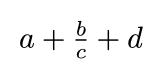
What actually comes out is only b/c treated as a fraction, with a and d left outside it entirely — nothing like the (a+b)/(c+d) that was intended. To skip the manual-parentheses hassle, switch to the frac function, whose two arguments are the numerator and denominator, with grouping built in:
1 | $frac(a+b, c+d)$ |

Worth a side note: binom, which looks similar, is actually a different thing entirely — it’s the binomial coefficient. The output is a pair of round parentheses wrapping two stacked numbers, with no dividing line, a distinct mathematical object from a fraction. Don’t mix the two up:
1 | $binom(n, k)$ |

Common Math Functions
Functions like sin, cos, ln, and exp render upright automatically in Typst — they’re never italicized the way a regular variable would be:
1 | $sin(x) + cos(x)$, $ln(x)$, $exp(x)$ |
lim is also a built-in function, and its subscript can take an arrow directly to show what a variable is approaching:
1 | $lim_(x -> 0) (sin(x))/x = 1$ |
Worked Example
Style and Spacing Control
This last section rounds up the math font styles you’ll reach for most often, plus how to adjust spacing and layout by hand.
Math Font Styles
Variables in math mode default to italic, but mathematical convention calls for a different font in some situations. Typst has built-in functions for all of these — no extra packages needed:
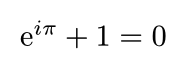
Upright: constants like Euler’s number $e$ and the imaginary unit $i$ are conventionally set upright, unlike an ordinary italic variable:
1 | $upright(e)^(i pi) + 1 = 0$ |
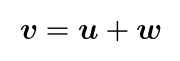
Bold: vectors are conventionally bold, replacing the arrow notation:
1 | $bold(v) = bold(u) + bold(w)$ |
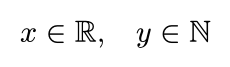
Blackboard bold: the standard way to write number sets, like the reals or naturals:
1 | $x in bb(R), quad y in bb(N)$ |
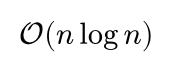
Calligraphic: common for sets and algorithmic-complexity notation, like Big-O:
1 | $cal(O)(n log n)$ |
Fraktur: rarer, usually showing up in algebra — for instance, Lie algebras:
1 | $frak(g)$ |

Adjusting Spacing by Hand
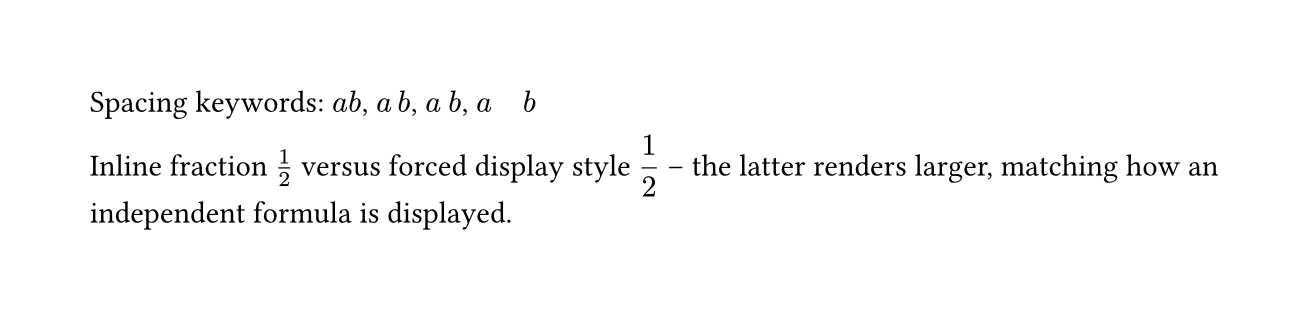
Spacing between symbols in math mode is handled automatically, but sometimes it still needs a manual nudge. The simplest tools are a handful of built-in spacing keywords, in increasing width:
1 | $a b$, $a thin b$, $a med b$, $a quad b$ |
Separately, Day 5 noted that inline and independent formulas lay out differently — structures like fractions and limits get more room to breathe in an independent formula. To apply that same independent-formula layout inside an inline formula, wrap it in the display function:
1 | Inline fraction $1/2$ versus forced display style $display(1/2)$ |
Worked Example
Summary
This post started with symbol variants and accents, then grouped sub/superscripts and roots; moved on to the two ways of writing fractions, the parentheses gotcha, frac, and binom (which looks like a fraction but isn’t); covered built-in functions like sin, cos, and lim; and finished with the upright, bold, blackboard-bold, calligraphic, and fraktur math styles, plus spacing keywords and the display function for manual layout control.
The next post moves into more advanced math typesetting: matrices, piecewise functions, and multi-line aligned equations. See you next time~