In the previous post, we covered advanced list syntax, along with links, label references, and a few everyday bits of markup like line breaks and smart quotes. This post moves on to two more features you’ll use constantly: code blocks, and the one everyone’s been waiting for (or just me) math formulas.
For code blocks, we’ll cover the difference between inline and block code, and show how to turn on syntax highlighting and switch themes. For math formulas, we’ll start with the basics — inline formulas, standalone formulas, and the rule for whether text in math mode gets read as a variable or a symbol — leaving deeper symbol, fraction, and matrix coverage for a dedicated math post later. The goal here is simply to get your Typst document to the point where it can show code snippets and typeset math.
Code Blocks
Writing a document sometimes means pasting in a code snippet. Typst has built-in syntax for both inline and block code, and block code even gets automatic syntax highlighting — no extra package needed.
Inline Code
Wrap text in a pair of backticks ` and it becomes inline code — the content inside is displayed exactly as plain text and won’t be interpreted as markup syntax:
1 | This is inline `let x = 1` code. |
Block Code and Syntax Highlighting
Three (or more) backticks1 with an actual line break inside become a standalone block of code. Write a language identifier immediately after the opening backticks (no space allowed), and Typst automatically applies syntax highlighting for that language:
1 | ```python |
The language identifier supports most common programming languages, plus three special ones for Typst itself: typ (markup syntax), typc (code syntax), and typm (math syntax) — handy for showing off Typst’s own syntax. In fact, every example so far in this post has been highlighted using the typst identifier.
Here’s a rundown of some commonly used language identifiers2:
| Language | Code | Language | Code |
|---|---|---|---|
| Python | python |
JavaScript | javascript |
| TypeScript | typescript |
Java | java |
| C | c |
C++ | cpp |
| Go | go |
Rust | rust |
| Ruby | ruby |
PHP | php |
| HTML | html |
CSS | css |
| JSON | json |
YAML | yaml |
| Bash | bash |
SQL | sql |
Customizing Code Style
Behind the scenes, code blocks map to the raw function, so you can use a show rule to adjust their style uniformly.
Changing the Font
The most basic need is switching to a monospaced coding font. Popular free choices include Cascadia Code, JetBrains Mono, Fira Code, and Source Code Pro — the author’s own go-to is JetBrains Mono:
1 | #show raw: set text(font: "JetBrains Mono") |
Background Color
To make a code block look more like an editor, you can give it a background color. Here we use raw.where(block: true) to select only block code (inline code is unaffected), then wrap it in a block:
1 | #show raw.where(block: true): it => block( |
Showing Line Numbers
raw has no built-in line-number parameter, but you can apply a show rule to raw.line (each line inside a code block) to build your own line numbers:
1 | #show raw.line: it => { |
it.number is that line’s number (starting from 1), and it.body is that line’s content with syntax highlighting already applied. Placing the two side by side gives you a line-number-plus-code effect, and it stacks fine with the background-color rule from before.
Switching the Color Theme
If you want to swap out the syntax-highlighting colors entirely, use the raw function’s theme parameter to load a .tmTheme theme file. Plenty of ready-made themes are available online — take Dracula, a dark theme supported by many editors, as an example. Download its Dracula.tmTheme, drop it in your project folder at the same level as your main Typst file, and you can reference it directly:
1 | #set raw(theme: "Dracula.tmTheme") |
After switching to a dark theme, remember to also change the code block’s background to a matching dark color (here we use Dracula’s official background color, #282a36) — otherwise the highlighted colors will clash with the original white background and become hard to read.
Full Example
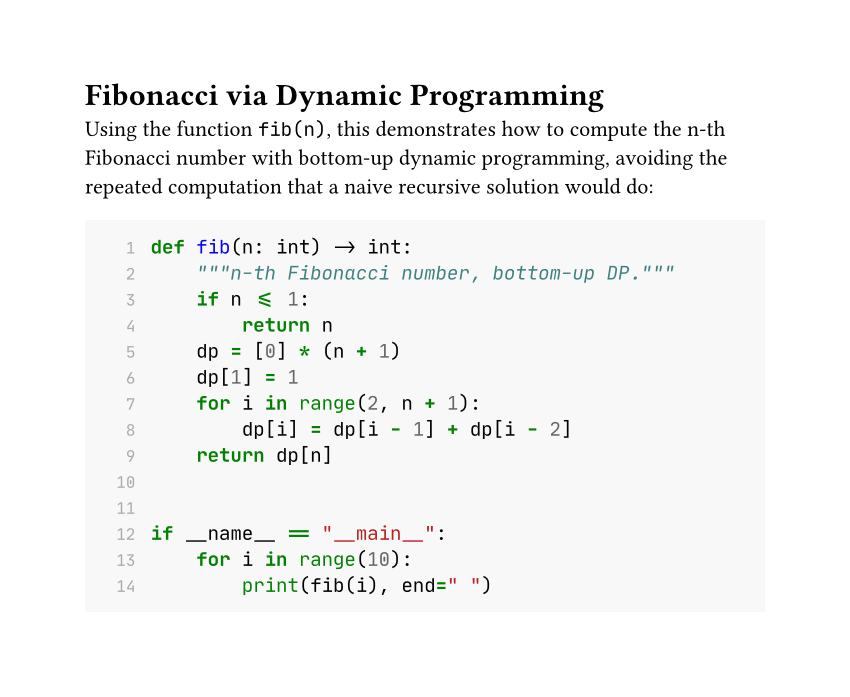
Let’s put inline code, syntax highlighting, fonts, background color, line numbers3, and a custom theme all together, with a Python example computing Fibonacci numbers via dynamic programming. The color scheme mimics the default style of LaTeX’s minted package (light gray background, green keywords, blue function names):
1 | #set text(font: ("Libertinus Serif", "PingFang TC"), size: 11pt) |
After compiling with typst compile, here’s the result:
An Introduction to Math Formulas
Typst uses a pair of $ symbols to enter math mode, and content inside is typeset according to mathematical formatting rules — no need to load extra ams-style packages the way you would in LaTeX.
Inline and Standalone Formulas
Whether there’s a space between $ and the content determines whether the formula stays inline within the paragraph or breaks out onto its own line.
1 | The Pythagorean theorem can be written as $x^2 + y^2 = z^2$. |
If you leave a space on each side between $ and the content, it becomes a standalone formula — automatically centered on its own line, which suits formulas important enough to want emphasized:
1 | $ x^2 + y^2 = z^2 $ |
But the more recommended style is
1 | $ |
which avoids any confusion with the body text.
Variable Rules
Text in math mode follows a different set of interpretation rules from ordinary paragraphs: a single letter is always shown as an italic variable, like or . But two or more letters are treated as one complete identifier — Typst looks for a matching built-in symbol or variable, and if it can’t find one, compilation fails outright:
1 | $ xy $ |
This fails to compile, with the error unknown variable: xy — because Typst looks up xy as a single name, not as “x times y”. If you want the two letters to be separate variables (to get the effect of “x times y”), leave a space between them:
1 | $ x y $ |
If you simply want to display the letters xy themselves (not as a math symbol), wrap them in quotes so Typst treats them as plain text — they’ll render upright, not italicized:
1 | $ "xy" $ |
Names like pi and alpha are multiple letters too, but since they’re built-in Typst symbol names, you can use them directly — they’re automatically converted into the corresponding Greek letters, $\pi$ and $\alpha$.
Common Math Symbols
Besides Greek letters like $\pi$ and $\alpha$, Typst also has a large built-in set of operators, arrows, and relational symbols — just type the name to use them, no need to memorize the Unicode code point behind each one:
| Symbol | Name | Symbol | Name |
|---|---|---|---|
| $\pi$ | pi |
$\sum$ | sum |
| $\infty$ | infinity |
$\int$ | integral |
| $\leq$ | lt.eq |
$\geq$ | gt.eq |
| $\to$ | arrow.r |
$\approx$ | approx |
1 | $ pi approx 3.14, quad sum_(i=1)^n i = (n(n+1)) / 2 $ |
For the full symbol list, check the official reference — there are far more than you’d ever use at once. Deeper symbol usage and layout techniques are saved for a dedicated math post later on.
Full Example
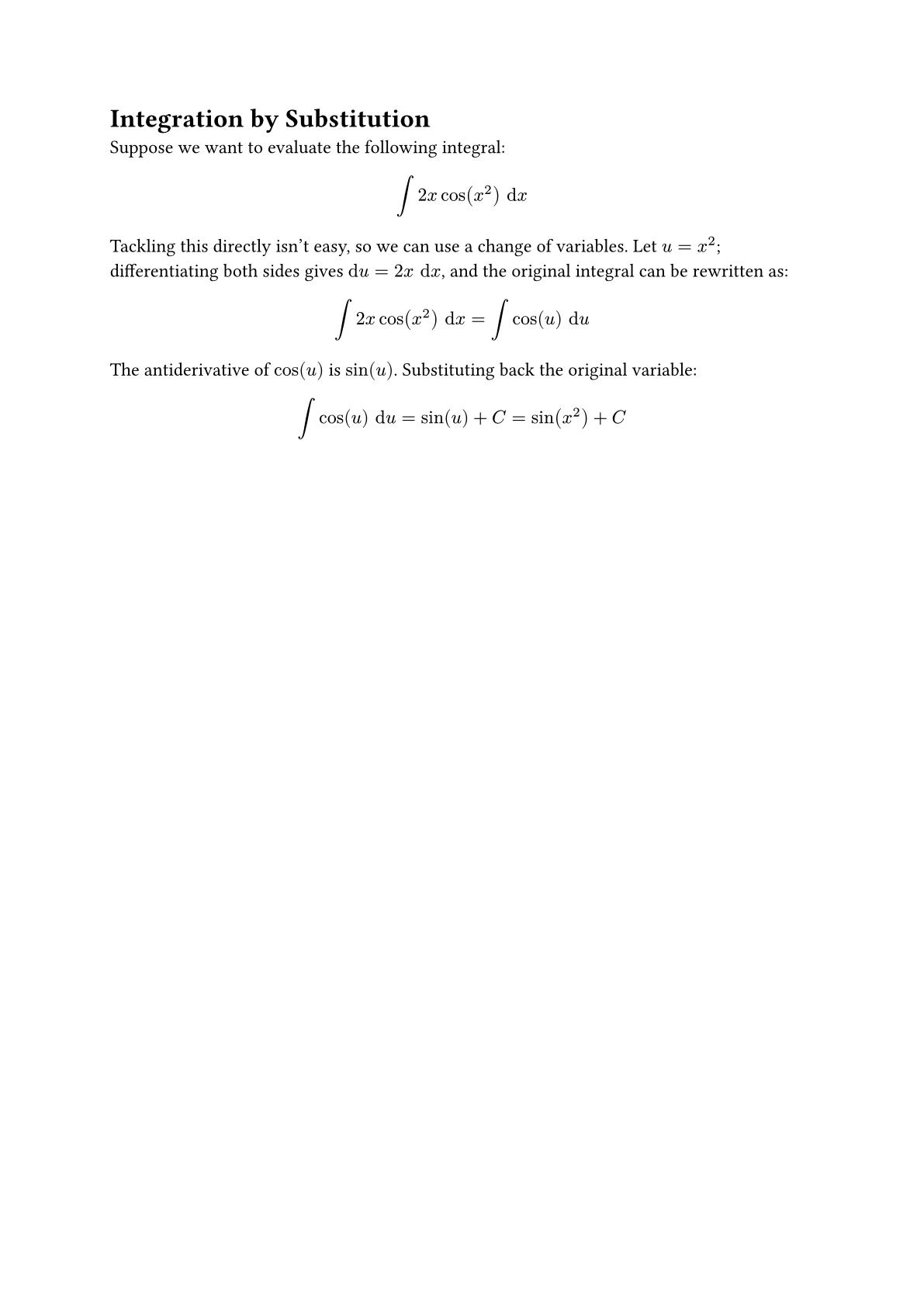
Let’s put inline formulas, standalone formulas, variable rules, and common symbols together, with an example of integration by substitution:
1 | #set text(font: ("Libertinus Serif", "PingFang TC"), size: 12pt) |
After compiling with typst compile, here’s the result:
Summary
This post rounded out two commonly used pieces of markup: code blocks and math formulas. We covered the difference between inline and block code, how to turn on syntax highlighting for block code, and several ways to customize raw — changing the font, adding a background color, showing line numbers, and switching the color theme. For math formulas, we went from the distinction between inline and standalone formulas, through the interpretation rules for single-letter versus multi-letter text in math mode, to the usage of a few common symbols. Deeper symbols, fractions, and matrices are saved for a dedicated math post later on.
Next up, we’ll move into page and layout settings, tackling the basics you can’t avoid when typesetting — paper size, margins, and columns!
See you next time~
Code for this post: day05-markup-code-math
1. Syntactically, three or more backticks are all valid — four or five can technically open a block too — but in practice almost nobody writes it that way; stick with three. The one common exception is exactly what this post does: when you need to show an example of “how to write a triple-backtick block”, you need extra backticks to wrap around it. ↩
2. Typst doesn’t publish a complete list of supported languages — what’s listed above is just a common subset. For a language not in the table, the most reliable way to check is to just compile and see: if the colors change, the identifier is correct; if it stays plain black text, there’s no match, so try a different identifier. ↩
3. Here, theshow raw.linerule that adds line numbers to block code is nested insideraw.where(block: true)rather than written at the top level — because the line-number rule actually applies to inline code too. If it were placed at the top level, even inline code like`fib(n)`would end up with a stray line number in front of it; nesting it inside the block-only rule is what limits the effect to block code only. ↩