In the last post we set up our environment and ran our first Hello World. Now it is time to write real programs, and the first step is variables and types. In Python, a variable can hold anything, and its type is only known once the program runs. Go is different: it is a statically typed language, which means the type of every variable is fixed at compile time, and if the types do not match, the compiler rejects the program with an error.
This post starts with the two ways of declaring a variable and the basic types in Go, and then moves on to type conversion and a few related topics.
Variables in Go
Every variable in Go has a fixed type. You can state it explicitly when you declare the variable, or let the compiler infer it from the value. Go gives us two ways to declare a variable: var, and the short declaration :=.
Declaring with var
var is the most complete form. Its syntax is
1 | var name type = value |
For example:
1 | var name string = "gopher" |
The type can also be left out, and Go will infer it from the value on the right. In the example below, name is a string and age is an int:
1 | var name = "gopher" |
Declaring with :=
Inside a function, the more common form is :=. It declares a variable and assigns a value in one step, and the type is again inferred from the value:
1 | func main() { |
The biggest difference between := and var is where they can be used: var works both inside and outside functions, while := can only be written inside a function. If you write it outside a function, the compiler reports this error:
1 | syntax error: non-declaration statement outside function body |
Outside a function, only declarations are allowed, meaning statements that start with var, const, func or type, and := is not a declaration keyword. Here is where each form can be used:
| Location | var |
:= |
|---|---|---|
| Outside a function | Allowed | Not allowed |
| Inside a function | Allowed | Allowed (more common) |
Assignment and Redeclaration
If you expect to change a variable’s value after declaring it, use =. The meaning of := is to declare a new variable, so using := again on an existing variable causes a compile error:
1 | age := 3 |
Also, once a type is decided, it cannot change. In the example below, age already has the type int, so assigning a string to it is a compile error too:
1 | age := 3 |
When you declare several variables at once, the left side of := only needs at least one new name to compile. Names that already exist are simply assigned, and only the new names are actually declared.
1 | age, name := 3, "gopher" |
Types in Go
A type determines which values a variable can hold and which operations can be applied to them (The Go Project, 2026, Types). Go’s types fall into two groups: the types Go predeclares, and composite types built from existing ones. The table below lists all of Go’s types. Click Integers and Composite types to see each type on its own:
| Category | Type | Description |
|---|---|---|
| Boolean | bool | The truth values true and false |
| Show more | 13 types | |
int8 | 8-bit signed integer | |
int16 | 16-bit signed integer | |
int32 | 32-bit signed integer | |
int64 | 64-bit signed integer | |
uint8 | 8-bit unsigned integer | |
uint16 | 16-bit unsigned integer | |
uint32 | 32-bit unsigned integer | |
uint64 | 64-bit unsigned integer | |
int | Signed integer whose size depends on the implementation: 32 or 64 bits | |
uint | Unsigned integer of the same size as int | |
uintptr | Unsigned integer large enough to hold the bits of a pointer | |
byte | Alias for uint8 | |
rune | Alias for int32 | |
| Floating point | float32 | IEEE 754 32-bit floating-point number |
float64 | IEEE 754 64-bit floating-point number | |
| Complex | complex64 | Complex number whose real and imaginary parts are both float32 |
complex128 | Complex number whose real and imaginary parts are both float64 | |
| String | string | A sequence of bytes; the content cannot be modified once created |
| Show more | 8 types | |
[n]T | Array: a fixed-length sequence of elements of the same type | |
[]T | Slice: a description of a contiguous section of an underlying array | |
struct | A sequence of named fields, each with a name and a type | |
*T | Pointer: points to a variable of some type | |
func | Function: the set of all functions with the same parameter and result types | |
interface | Defines a set of types; any value belonging to that set can be stored in it | |
map[K]V | An unordered group of elements indexed by unique keys | |
chan T | Channel: lets concurrently running functions send and receive values |
In this post we will cover integers, floating-point numbers, strings and booleans. The other types will be explained in more detail when we reach the topics that use them.
Integers
Go’s integer types are classified by two things: how many bits they use, and whether they can represent negative numbers:
| Size | Signed (can be negative) |
Unsigned (cannot be negative) |
|---|---|---|
| Specified bits | int8, int16, int32, int64 |
uint8, uint16, uint32, uint64 |
| Machine-dependent | int |
uint |
- The number after the name is the number of bits, so
int8uses 8 bits intanduintdo not specify a bit count; their size depends on the machine. On a 64-bit machine they are 64 bits
Different bit counts can represent different ranges of numbers. In Python, integers have no upper limit, so you never have to think about this, but in Go you need to pay attention to it.
The Range of Integers
An $n$-bit unsigned integer ranges from $0$ to $2^n - 1$, and an $n$-bit signed integer ranges from $-2^{n-1}$ to $2^{n-1} - 1$.
Show derivation
The relationship between the number of bits and the range can be derived. Suppose we use $n$ bits. Each bit can be 0 or 1, so there are $2^n$ different combinations in total, which means we can represent at most $2^n$ different integers.
An unsigned integer uses all of these combinations for non-negative integers, counting up continuously from 0, so its range is
A signed integer has to represent both negative and non-negative numbers, so the $2^n$ combinations are split in half, $2^{n-1}$ each. The negative half is $-1, -2, \cdots, -2^{n-1}$, and the non-negative half is $0, 1, \cdots, 2^{n-1} - 1$. Zero takes one of the non-negative slots, so there is one fewer positive number than negative numbers, and the range is
Take int8 as an example. Here $n = 8$, and substituting into Eq. $\eqref{eq:int-range}$ gives
For uint8, substituting into Eq. $\eqref{eq:uint-range}$ gives $0 \leq x \leq 2^{8} - 1 = 255$.
In the same way, we get the range of each type (The Go Project, 2026, Numeric types):
| Signed integer | Bits | Minimum | Maximum |
|---|---|---|---|
int8 |
8 | -128 | 127 |
int16 |
16 | -32,768 | 32,767 |
int32 |
32 | -2,147,483,648 | 2,147,483,647 |
int64 |
64 | -9,223,372,036,854,775,808 | 9,223,372,036,854,775,807 |
| Unsigned integer | Bits | Minimum | Maximum |
|---|---|---|---|
uint8 |
8 | 0 | 255 |
uint16 |
16 | 0 | 65,535 |
uint32 |
32 | 0 | 4,294,967,295 |
uint64 |
64 | 0 | 18,446,744,073,709,551,615 |
Integer Overflow
What happens if the result of an operation goes outside the range? Let us look at an example:
1 | var x int8 = 127 |
This program compiles, and it does not report an error when it runs, yet 127 + 1 became -128. This is because when a value goes out of range, Go does not report an error or stop the program (The Go Project, 2026, Integer overflow). Instead, it wraps around to the other end of the range1, like an odometer rolling from 999999 back to 000000.
The wrapping rule is this: an $n$-bit integer can only keep $2^n$ different results, so for any integer $x$, the value you actually get is the one that has the same remainder as $x$ when divided by $2^n$ and lies within the range.
Show derivation
Shift $x$ by $2^{n-1}$ so that the range starts from 0, take the remainder, and then shift back. This gives
For int8, $n = 8$, so $2^{n-1} = 128$ and $2^n = 256$.
$x = 127 + 1 = 128$:
$x = 100 + 100 = 200$:
$x = -128 - 1 = -129$:
Let us verify this by actually running a program:
1 | var x1 int8 = 127 |
The range of an unsigned integer already starts from 0, so no shift is needed and the wrapping rule simplifies to
For example, for uint8, substituting 255 + 1 into Eq. $\eqref{eq:wrap-unsigned}$ gives $256 \bmod 256 = 0$, and running it really does print 0.
Note that the compiler can only check cases where it already knows the value at compile time. If you hard-code a constant that is out of range, you get a compile error right away:
1 | var x int8 = 128 |
But if the value is the result of an operation on variables, the compiler does not know it at compile time, so the value can only wrap around at run time, with no warning at all. This is why integer overflow so easily turns into a bug. Before you use an integer type, estimate whether your values could exceed its range.
Floating-Point Numbers
Numbers with a decimal part use floating-point types. Go has two of them, float32 and float64, where the number is the bit count, and float64 is the one you normally use. Go has no type called float, and writing it causes a compile error:
1 | var a float = 3 |
Both are IEEE 754 floating-point numbers2 (The Go Project, 2026, Numeric types). They differ mainly in precision, and secondarily in range:
| Type | Bits | Significand bits $p$ | About this many decimal digits | Maximum | Smallest positive number |
|---|---|---|---|---|---|
float32 |
32 | 24 bits | about 7 | $3.4 \times 10^{38}$ | $1.4 \times 10^{-45}$ |
float64 |
64 | 53 bits | about 15 to 16 | $1.8 \times 10^{308}$ | $5 \times 10^{-324}$ |
Floating-Point Precision
A floating-point number stores a value using a limited number of binary significant digits. IEEE 754 writes a number as a sign, an exponent and the significant bits. With $p$ significant bits,
where $s \in \{0, 1\}$ is the sign, $b_i \in \{0, 1\}$ is the $i$-th significant bit, and $n$ is the exponent. The first bit $b_0$ is always 1, so it is not stored: float64 stores only 52 bits, and with this implicit 1 it has $p = 53$. In other words, a number can be represented exactly only if a finite sum of negative powers of 2 can make it, for example $0.625 = 2^{-1} + 2^{-3}$.
Take $0.625$. Make it from negative powers of 2: $0.625 = 2^{-1} + 2^{-3}$, which is $0.101_{2}$ in binary. Move the point to just after the first 1 and you get $1.01_{2} \times 2^{-1}$.
By Eq. $\eqref{eq:float-value}$, the parts are
- the sign $s = 0$ (positive)
- the exponent $n = -1$
- the significant bits $b_0 = 1$ (implicit), $b_1 = 0$, $b_2 = 1$, and all the rest 0
Substituting into Eq. $\eqref{eq:float-value}$ gives
Only finitely many terms are needed, so 0.625 can be stored exactly. You can look at the 64 bits of a float64 directly:
1 | fmt.Printf("%016x\n", math.Float64bits(0.625)) |
The first three hex digits 3fe hold the sign 0 and the exponent field $1022 = 1023 - 1$, so $n = -1$. The 4 after them (0100 in binary) starts the fraction, that is $b_1 = 0$ and $b_2 = 1$, with all the rest 0.
By Eq. $\eqref{eq:float-value}$, the next representable number above 1 is the one with the last bit $b_{p-1}$ set to 1, so the gap between 1 and it is
The smaller this gap, the higher the precision. float32 is accurate to about 7 decimal digits, and float64 to about 15 to 16.
Show derivation
To convert this into decimal digits, we can compare how many values each can tell apart: $p$ binary bits give $2^p$ combinations, and $d$ decimal digits give $10^d$. Setting the two equal, $10^d = 2^p$, and taking $\log_{10}$ of both sides gives
For float32, $p = 24$, and substituting into Eq. $\eqref{eq:float-eps}$ and Eq. $\eqref{eq:float-digits}$ gives
For float64, $p = 53$, so
This agrees with the gaps actually measured with math.Nextafter (1.1920929e-07 and 2.220446049250313e-16).
Neither type can store exactly 0.1, but float64 gets much closer3:
1 | var a float32 = 0.1 |
This is because 0.1 needs infinitely many terms, while Eq. $\eqref{eq:float-value}$ adds up only to $i = p - 1$.
Show derivation
First write 0.1 in the form $1.\text{xxx} \times 2^{n}$. Since $0.1 = 1.6 \times 2^{-4}$, we only need to convert $0.6$ to binary. Multiply by 2 each time and take the integer part. An integer part of 1 means this bit’s weight fits, and the fractional part is multiplied by 2 again:
| Step | Times 2 | Integer part (this bit) |
Fractional part |
|---|---|---|---|
| 1 | $0.6 \times 2 = 1.2$ | 1 | 0.2 |
| 2 | $0.2 \times 2 = 0.4$ | 0 | 0.4 |
| 3 | $0.4 \times 2 = 0.8$ | 0 | 0.8 |
| 4 | $0.8 \times 2 = 1.6$ | 1 | 0.6 |
The fractional part in step 4 is $0.6$ again, so 1001 repeats forever and never ends:
float64 keeps only 52 bits after the point, which is exactly 1001 repeated 13 times. The first discarded bits are 1001…: the first one is 1 and nonzero bits follow, which is more than half, so rounding goes up and the last four bits 1001 become 1010. The stored value is therefore slightly larger than 0.1, which matches the 0.10000000000000000555 printed above.
You can look at the 64 bits of a float64 directly:
1 | fmt.Printf("%016x\n", math.Float64bits(0.1)) |
The first three hex digits 3fb hold the sign 0 and the exponent field $1019 = 1023 - 4$ (the field stores $n + 1023$), so $n = -4$. The remaining 13 digits 999999999999a are the fraction: twelve 9s (1001) and the rounded-up a (1010).
Limited precision can also cause adding 1 to have no effect: from $2^{24}$ for float32, and from $2^{53}$ for float64, the gap between neighboring numbers is greater than 1, so adding 1 gets rounded back to the original number.
Show derivation
When a value falls in $2^k \leq x < 2^{k+1}$, the gap between neighboring representable numbers is
For float32, $p = 24$. When $k = 24$, that is, starting from $2^{24} = 16{,}777{,}216$, the gap is $2^{24-24+1} = 2$, which is greater than 1, so adding 1 gets rounded back to the original number:
1 | var c float32 = 16777216 // 2^24 |
For float64, $p = 53$, so the same thing only happens at $2^{53}$.
We usually use float64 because its precision and range are enough for most purposes, and because functions in the math package (such as math.Sqrt) take float64. float32 is better suited to cases where there is a lot of data and you need to save memory.
Strings
A string has to be wrapped in double quotes ", and its type is string. Unlike in Python, the content of a Go string is a sequence of bytes encoded in UTF-84, not a sequence of characters, so len returns the number of bytes:
1 | s := "Go你好" |
In Python, len("Go你好") is 4, but in Go it is 8. This is because in UTF-8, different characters take up different numbers of bytes:
| Character | Bytes | Examples |
|---|---|---|
| ASCII (English letters, digits, half-width symbols) | 1 | G, o |
| Common Chinese characters | 3 | 你, 好 |
| Emoji | 4 | 😀 |
So Go你好 is $1 + 1 + 3 + 3 = 8$ bytes. ASCII has only 128 characters in total, and the full chart is in Figure 1.
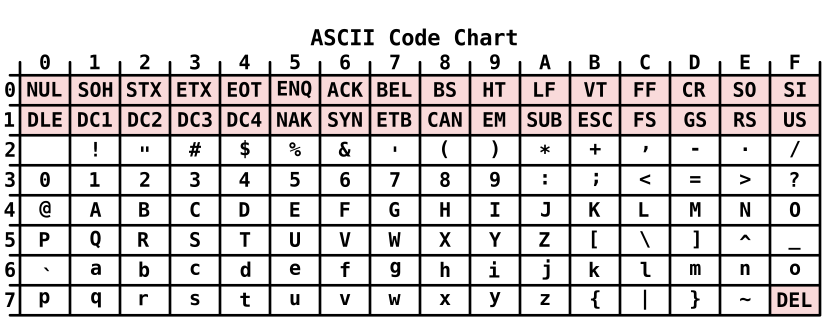
When you index into a string, what you get is also a byte:
1 | s := "Go你好" |
s[0] is the byte 71 for G, and s[2] is 228, the first of the three bytes of 你, which is not a complete character. The type uint8 is exactly the 0 to 255 range from the integer section above.
Go calls the number that corresponds to one character a rune, and its type is an alias of int32. When you want to process a string character by character, for example to count characters, you need runes. We will leave that for a later post dedicated to strings.
Booleans
The boolean type is bool. It has only two values, true and false, and both are lowercase, unlike Python’s True and False:
1 | a := true |
In Python, True is actually the integer 15, so True + 1 gives 2. A Go bool is not a number at all. You cannot use 1 or 0 in its place, you cannot use it in numeric operations, and you cannot even convert it to a number:
1 | var b bool = 1 |
None of these three lines compile. There is no conversion at all between bool and the numeric types, which fits Go’s preference for being explicit instead of converting automatically, as we saw earlier.
Type Conversion and Zero Values
The types we have just seen often need to work together in real programs. This section explains how to convert between types, and what Go fills in for a variable that is declared without a value.
Type Conversion
In Python, 3 * 1.5 automatically gives 4.5. In Go, however, different numeric types cannot be mixed directly in an operation (The Go Project, 2026, Numeric types):
1 | var a int = 3 |
You first have to convert one of them to the type of the other. The syntax is
1 | type(value) |
With 3 and 1.5, there are two obvious approaches: convert 1.5 to an integer, or convert 3 to a floating-point number. Let us try the first one:
1 | var a int = 3 |
But converting 1.5 to int truncates it to 1, and the decimal part is lost. The result is 3 * 1 = 3, not the 4.5 we wanted.
So we have to go the other way and convert the integer to a floating-point number:
1 | var a int = 3 |
3 becomes 3.0, with no loss of information. The general principle is to convert to a type that can represent both numbers completely: most values an integer can represent can also be represented by a floating-point number6, but an integer cannot represent 1.5.
Why Doesn't Go Convert Automatically?
Automatic conversion makes it easy to lose track of whether an expression is unsigned, how large a value is, whether it might overflow, and whether the result is the same on different machines. Go chooses to make the code a little longer with explicit conversions in exchange for clarity and portability (The Go Project, n.d., Why does Go not provide implicit numeric conversions?). It also lets anyone reading the code see at a glance where a type conversion happens, which is where information might be lost.
In the other direction, when you convert a floating-point number to an integer, the decimal part is discarded:
1 | var f float64 = 3.9 |
This rule is called rounding toward zero (The Go Project, 2026, Conversions). The value is truncated in the direction of zero. It is not rounding to the nearest integer, and it is not always rounding down (taking the floor).
Show derivation
In mathematical terms, this is
where $\operatorname{sgn}(x)$ is the sign of $x$. Substituting $x = 3.9$ gives $1 \times \lfloor 3.9 \rfloor = 3$, and substituting $x = -3.9$ gives $-1 \times \lfloor 3.9 \rfloor = -3$. Compared with the floor, $\lfloor -3.9 \rfloor = -4$, we can see that Eq. $\eqref{eq:trunc}$ differs from the floor for negative numbers.
If you need to round to the nearest integer, first use math.Round, and then convert to an integer.
Finally, constants and variables follow different conversion rules. For a constant, the compiler already knows at compile time that 3.9 is not an integer, so it rejects the conversion outright:
1 | fmt.Println(int(3.9)) |
Constants are checked at compile time, and variables are handled at run time. We have already seen this difference once in integer overflow, and it shows up again in type conversion.
Zero Values
In Python, a variable must be assigned a value before you can use it. In Go, a variable has a value as soon as it is declared, and if you do not give it one, it gets the zero value of its type:
1 | var n int |
The zero value is decided by the type. The zero values of all the types are as follows (The Go Project, 2026, The zero value):
| Type | Zero value |
|---|---|
bool |
false |
| Numeric types (integers, floating-point numbers, complex numbers) | 0 |
string |
"" (the empty string) |
Pointers, functions, interface, slices, channels, map |
nil |
Arrays, struct |
Each element or field takes the zero value of its own type |
So var i int and var i int = 0 are exactly equivalent. We will explain nil when we get to slices and maps.
Exercises
The problems below match the sections above. Each has a solution, folded by default, so think it through before opening it.
Predict the Output
Problem 1: What does this program print?
1 | var a int8 = 127 |
Show solution
1 | // -128 255 false |
a:127 + 1goes out of range forint8and wraps around to-128.b:0 - 1foruint8wraps to $-1 \bmod 2^8 = 255$.x+y == 0.3: neither 0.1 nor 0.2 can be stored exactly, and their sum is0.30000000000000004, which is not the number closest to 0.3, so the result isfalse.
Problem 2: What does this program print? Why is it different from the last part of Problem 1?
1 | x, y := 0.5, 0.25 |
Show solution
1 | // true |
0.5 = $2^{-1}$, 0.25 = $2^{-2}$, and 0.75 = $2^{-1} + 2^{-2}$. Each can be made from a finite sum of negative powers of 2, so all of them are stored exactly and the addition has no error. 0.1 and 0.2 need infinitely many terms, which is what causes the result in Problem 1.
Problem 3: What does this program print?
1 | var ( |
Show solution
1 | // 0 0 "" false |
A variable declared without a value gets its zero value: 0 for numbers, the empty string for strings, and false for booleans.
Problem 4: What does this program print? Why?
1 | a := "hi" |
Show solution
1 | // 2 6 |
len returns the number of bytes, not characters. In UTF-8 an English letter takes 1 byte and a Chinese character takes 3, so 你好 is $2 \times 3 = 6$.
Problem 5: What does this program print? How is it computed?
1 | var a uint8 = 200 |
Show solution
1 | // 44 |
a and b are variables, so the compiler does not know the result of the addition at compile time. The program compiles and wraps around when it runs. A uint8 has $2^8 = 256$ values, so by Eq. $\eqref{eq:wrap-unsigned}$ we get $300 \bmod 256 = 44$.
Fix the Program
Problem 6: Does this program compile? If not, what are the two ways to fix it, and what does each print?
1 | var a int = 10 |
Show solution
It does not compile. int and float64 are different types, and Go does not convert between them automatically:
1 | // invalid operation: a * b (mismatched types int and float64) |
Fix one: convert a to float64:
1 | fmt.Println(float64(a) * b) |
Fix two: convert b to int, which drops the fractional part (2.5 becomes 2):
1 | fmt.Println(a * int(b)) |
Problem 7: This program tries to swap x and y. Does it compile? If not, how do you fix it?
1 | x := 10 |
Show solution
It does not compile. The left side of := needs at least one new variable, and here both x and y already exist:
1 | // no new variables on left side of := |
Change := to =. The right side is fully evaluated first and then assigned to the left side, so no temporary variable is needed:
1 | x, y = y, x |
Problem 8: Does this line compile? Why is the result different from Problem 5?
1 | var c uint8 = 200 + 100 |
Show solution
It does not compile:
1 | // cannot use 200 + 100 (untyped int constant 300) as uint8 value in variable declaration (overflows) |
200 + 100 is a constant expression, so the compiler works out 300 at compile time and knows uint8 cannot hold it, which is a compile error. In Problem 5, a + b involves variables, so the result is known only at run time and simply wraps around to 44.
Hands-On Problem
Problem 9: A height of 170 (cm) and a weight of 65 (kg), both declared as int. Compute the BMI and print it with 1 decimal place. The expected output is 22.5.
[Note] BMI = weight (kg) divided by the square of height (m).
Show solution
1 | height := 170 |
Convert first, then divide. If you write float64(height / 100), both sides of height / 100 are int, so integer division gives 1 first and the fractional part is already gone; converting to float64 afterwards cannot bring it back.
Summary
In this post we covered Go’s two ways of declaring a variable, var and :=, and four basic types: integers, floating-point numbers, strings and booleans. Go is a statically typed language, so types are never converted automatically; you have to write every conversion explicitly, and a variable with no value gets the zero value of its type. In the next post, we will look at operators.
1. Signed integers are stored in two’s complement, and when they overflow only the lowest $n$ bits are kept, so the result lands at the other end of the range. ↩
2. IEEE 754 is the international standard for floating-point arithmetic. It defines how floating-point numbers are stored and rounded, and most programming languages and processors follow it. ↩
3.fmt.Printfprints according to a format string.%.20fprints a floating-point number with 20 digits after the decimal point, and\nis a newline. We will also use%T(the type),%d(an integer),%q(a quoted string) and%t(a boolean) later. For the full list of formats, see the documentation of thefmtpackage. ↩
4. Unicode assigns a number to every character, and UTF-8 defines how that number is stored in 1 to 4 bytes. ↩
5. More precisely, Python’sboolis a subclass ofint, withTrue == 1andFalse == 0. ↩
6. More precisely, by Eq. $\eqref{eq:float-gap}$,float64has $p = 53$, and when $k \leq 52$ the gap $2^{k-52}$ between neighboring numbers is at most 1, so every integer up to $2^{53}$ can be represented exactly byfloat64, and the conversion loses no information. Integers beyond $2^{53}$ may no longer be exactly representable. ↩
References
The Go Project (2026, May 26). The Go Programming Language Specification (Language version go1.27). The Go Programming Language. https://go.dev/ref/spec
The Go Project (n.d.). Frequently Asked Questions (FAQ). The Go Programming Language. https://go.dev/doc/faq